

Available today
Live interpretation
Talk normally. Each person reads the sentence in the language they chose while it is still being spoken, and the original stays next to the translation.
How the interpreter worksLive interpretation, translated captions and minutes for multilingual teams.

Ember Live interprets what people say while they are saying it. Everyone reads captions in the language they chose, at the same moment, and the call ends with minutes that name the decision and the person who owns it.
ENMaya, speaking
Let’s ship the pilot in March, if legal signs off this week.
中文Wei, reading
如果法务本周签字,我们就在三月上线试点。
日本語Aiko, reading
法務が今週承認すれば、3月にパイロットを開始します。
العربيةOmar, reading
لنُطلق التجربة في مارس، إذا وافق القسم القانوني هذا الأسبوع.
Minutes
Written as the call ran
One sentence from the meeting, read in three of the languages its readers picked, then the minutes it became. Sample text, real layout.
Everyone at the table picks a language. Captions stream to all of them at once while the speaker is still talking, so nobody waits for a relay and nobody reads a summary of a summary.
Minutes are written while the call runs: the decision in the words it was agreed in, the person who took it, and the question left open. Export one as TXT, SRT, VTT, Markdown or JSON.
Ship the pilot in March, gated on legal sign-off.
Ben ships it once legal signs. Wei writes the customer note.
Whether the pilot includes the Spanish locale on day one.
A low-confidence passage is marked, not smoothed over: if a figure or a name was uncertain, the minutes say so instead of writing a number nobody said.
Minutes sit beside the call they came from, in the same workspace, so the decision and the recording are one link apart.
Docs, sheets, slides, mail, chat, calendar, tasks, drive, whiteboards, forms and approvals share one workspace and one translation. A message written in Chinese is read in Japanese without anyone re-typing it.
Mail中文 → EN
我们三月上线试点,法务本周签字。
We ship the pilot in March; legal signs this week.
Chat中文 → 日本語
我们三月上线试点,法务本周签字。
3月にパイロットを開始します。法務は今週承認します。
Doc中文 → ES
我们三月上线试点,法务本周签字。
Lanzamos el piloto en marzo; legal firma esta semana.
Calendar中文 → العربية
我们三月上线试点,法务本周签字。
نطلق التجربة في مارس، ويوقّع القسم القانوني هذا الأسبوع.
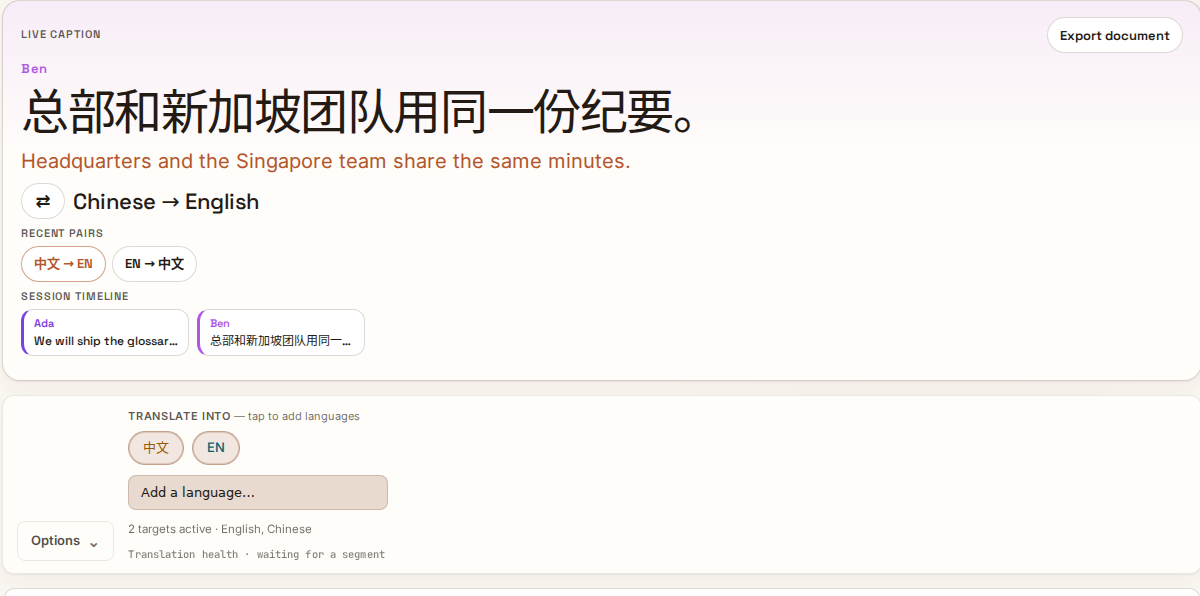
Not a mockup: a capture from the current build, with sample text on the captions.
Three tracks
Two of these ship today and one is in preview. Each card says which.
Available today
Talk normally. Each person reads the sentence in the language they chose while it is still being spoken, and the original stays next to the translation.
How the interpreter worksPreview
Hear the translation in the speaker's own voice, so a familiar person still sounds like themselves in another language.
In preview: record a short sample of your voice and give consent, and the interpreter can speak the translation in your own voice. Rolling out to every meeting.
Available today
Docs, sheets, slides, calendar, tasks, mail, chat, whiteboards and approvals sit in the same workspace, with the same sign-in and the same translation.
See the office suiteThe table asks every product the same three questions and records what its own documentation says. Where a competitor is ahead, the row says so: Teams already speaks back in a simulated voice, and Google Meet covers more languages than we can claim.
| Product | Live translation, in the meeting | Each person picks their own language | Runs inside another meeting app | Work suite around the call |
|---|---|---|---|---|
| Ember Live | Captions, live, in the language each person chose | Yes | Yes: the desktop app reads Zoom, Teams or Feishu audio | Yes |
| Google Meet | Speech translation, 63 languages, audio and captions | Yes | No, Meet only | Workspace apps, no translation in them |
| Microsoft Teams | Interpreter, 9 languages, speech to speech in a simulated voice | Yes | No, Teams only | Microsoft 365, no translation in it |
| Zoom | Translated captions, 35 languages, text only | Yes | No, Zoom only | No |
| Otter | Live notes in six named languages; no live translated captions stated | No | Joins Zoom, Meet and Teams as a bot | No |
| tl;dv | Transcript translated after the call, 30+ languages | No | Joins Zoom, Meet and Teams as a bot | No |
| Fathom | Notes and summaries; no translation stated | No | Joins the meeting as a bot | No |
Sources: the vendors' own product and pricing pages, checked 9 November 2026. Prices change; check before you quote one.
These are controls that exist in the current build, not a certification. We do not hold SOC 2 or ISO 27001, and the security page says so plainly.
Model calls are routed on the server. The browser never holds a provider key, and the client cannot choose the prompt, the provider or the model.
A guest joins one meeting with a link and no account, and sees that meeting only. The link can be revoked without touching anyone's account.
Passwords are stored as scrypt hashes. Sessions are revocable, so a lost device is one click away from losing access.
The team plan keeps an admin audit trail: who changed a glossary, who exported a meeting, and when.
Product facts · verified in the current Ember Live build · 16 October 2026
How it works
Talk in the language you think in. Ember Live listens to your mic, a browser tab or desktop audio and detects the language per sentence.
Each person reads captions in the language they chose, streamed in parallel while the speaker is still talking.
When the call ends, minutes list the summary, decisions and action items, ready to export as Markdown or JSON.
What a call looks like
This frame is drawn from the product: the same caption layout, the same language chips, and the decision and action the call left behind.
Platform
Speech is transcribed and translated as it happens, with automatic language detection and support for speakers who switch languages mid-sentence.
Each participant picks the language they read. Captions stream in every chosen language in parallel, so nobody waits for a relay.
Glossaries keep product names, acronyms, figures, currencies and dates consistent, and the output is checked against them.
Every meeting becomes a summary, decisions, open questions and assigned actions you can export and search later.
Someone joins ten minutes in? They get a short recap in their own language instead of interrupting the call.
Chat, docs, calendar, tasks, mail, whiteboards, forms and approvals live next to your meetings, with the same translation built in.
AI you can steer
Spark answers fastest for live captions. Lumen balances speed and depth for everyday work. Crown is for material where accuracy matters most. Clients never pick the prompt, provider or model, and provider keys never reach the browser.
How we protect itWorks where you meet
Host or join from a browser, share a guest link, and install it as an app on your device.
Interpret the audio of any meeting app, such as Zoom, Teams or Feishu, and float live captions over it on macOS and Windows.
Use email and password, or continue with a Google or Microsoft account. Guests join with a link and no account.
In the call
Partial results settle into final lines as the speaker finishes. Figures, names and dates are checked against what was said, and low-confidence passages are flagged instead of presented as fact.
Built for
Weekly reviews between headquarters and regional teams without a human relay on every call.
See operationsGlossaries and figure checks keep contract terms and amounts exact, and minutes carry the decisions forward.
See legal and financeShare a live viewer link so attendees follow along in their own language, no account required.
See education and eventsThe desktop app interprets the audio of the meeting you already use and floats captions over it.
Get the desktop appPricing
$0 no charge, no card
Live captions and translation on the Spark tier, guest links and basic minutes.
Start free$24 per user, per month, billed yearly
Adds the Lumen and Crown tiers, full minutes and the desktop app.
Talk to usLet's talk agreed for the team
Adds shared glossaries, an admin console with an audit trail, and a named contact.
Talk to usOpen Ember Live in your browser, or talk to us about a team rollout.